Subscribe to Anthropic Science
Features on AI-assisted discoveries, practical workflows, and field notes across the sciences.

In this post, Siddharth Mishra-Sharma, a researcher on the Discovery team, explains how to apply multi-day agentic coding workflows—test oracles, persistent memory, and orchestration patterns—to scientific computing tasks even outside of one’s domain.
Most scientists currently using AI agents work in a conversational loop, managing each step of the process on a tight leash. As models have become significantly better at long-horizon tasks over the last year or so, a new way of working emerged: rather than getting involved with every detail, we can specify the high-level objective and set a team of agents loose to work autonomously. This makes it possible to complete projects in mere hours that might otherwise take us days, weeks, or even months. Certain types of scientific tasks fit well within this model, e.g., reimplementing a numerical solver, converting legacy scientific software written in an old Fortran dialect to a modern language, and debugging a large codebase against a reference implementation. These are tasks where the work is well-scoped, the success criteria are clear, and human oversight can be occasional rather than continuous.
Anthropic’s C compiler project demonstrated a version of this, where Claude worked across roughly 2,000 sessions to build a C compiler capable of compiling the Linux kernel. This post describes how to set up a similar pattern for scientific computing tasks using Claude Code, with a typical academic lab in mind. As a concrete example, I will walk through using Claude Opus 4.6 to implement a differentiable version of a cosmological Boltzmann solver. This is numerical code that predicts the statistical properties of the afterglow of the Big Bang—the Cosmic Microwave Background, or CMB. It does this by evolving coupled equations for photons, baryons, neutrinos, and dark matter through the early universe.
Boltzmann solvers like CLASS and CAMB are core pieces of scientific infrastructure in cosmology, allowing us to constrain cosmological models using data from surveys like Planck and the Simons Observatory. A differentiable version—one that can propagate gradients through the full solver—enables the use of gradient-based inference methods, dramatically speeding up parameter estimation. Writing it in JAX is a natural fit here, since it gives us automatic differentiation and compatibility with accelerators (e.g., GPUs) essentially for free.
Notably, the task isn’t in my core scientific domain—I have a high-level familiarity with the tools and the science, but don’t have the expertise to complete it myself in any reasonable time frame. Groups who do have that expertise have built differentiable solvers in JAX with a subset of the features present in CLASS. These efforts typically represent months to years of researcher-time. The point here was to see if an agent could go further with minimal steering from a non-domain expert.
This kind of task is structurally different from the C compiler project, which can be farmed out to a large number of parallel agents. A Boltzmann solver, on the other hand, is a deeply coupled pipeline—a small numerical error or poor approximation in modeling how the early universe recombines can subtly shift everything downstream. It thus requires a different set of agent skills. Debugging requires tracing causally through the entire chain and drawing from domain knowledge, which may be better suited to a single agent working sequentially, spawning subagents as needed, and using the reference implementation to bisect discrepancies.
We'll use an HPC cluster running the SLURM job scheduler as our compute environment, but the core ideas—a progress file, a test oracle, an agent prompt with clear rules—apply regardless of where you run Claude Code.
In this shift toward managing an autonomous research team of agents, you should spend most of your time (in consultation with Claude), crafting a set of instructions that clearly articulates the project’s deliverables and relevant context. These instructions should live in a CLAUDE.md file located in the root directory. Claude treats this file specially, keeping it in context and referencing it for the overall plan. Crucially, Claude can edit these instructions as it works, updating them for future work as it works through issues.
Here is an early CLAUDE.md for the cosmological Boltzmann solver project, showing the overall plan and design decisions codified after an initial attempt at writing the solver. To arrive at this, I specified the high-level goals of the project—achieving full feature-parity with the reference CLASS implementation while being fully differentiable, and having an accuracy target of 0.1% against CLASS in the main science deliverables—and iterated with Claude until the plan seemed satisfactory. Given that 0.1% is the typical level of agreement between the two canonical Boltzmann codes CLASS and CAMB, this seemed like a good science target.
The progress file, which by convention we call here CHANGELOG.md, is the agent’s portable long-term memory, acting as a sort of lab notes. In CLAUDE.md, Claude was instructed to keep track of progress in this file.
A good progress file might track current status, completed tasks, failed approaches and why they didn't work, accuracy tables at key checkpoints, and known limitations. The failed approaches are important—without them, successive sessions will re-attempt the same dead ends. An entry might look like: “Tried using Tsit5 for the perturbation ODE, system is too stiff. Switched to Kvaerno5.” Here is the changelog for the running example, showing these elements.
While more open-ended scientific discovery via agents is certainly on the horizon, long-running autonomous scientific work today crucially depends on the agent having a way to know whether it’s making progress. For scientific code, this could be a reference implementation, a clearly quantifiable objective, or an existing test suite. It can also be helpful to instruct the agent to expand the test suite and run tests as it works, to prevent regressions. In my example task, Claude was instructed to construct and continuously run unit tests using CLASS C source as a reference implementation.
Git can be a good way to monitor and coordinate the agent’s progress in a hands-off manner. The agent should commit and push after every meaningful unit of work. This gives you a recoverable history if something goes awry, makes progress visible locally, and prevents work from being lost if, for instance, your compute allocation runs out mid-session.
Practically, this could be a set of instructions in CLAUDE.md, e.g. “Commit and push after every meaningful unit of work. Run `pytest tests/ -x -q` before every commit. Never commit code that breaks existing passing tests.”
For steering the agent, you can always SSH into the cluster and manually re-prompt and/or update its instructions. It is typically more ergonomic to simply ask a local instance of Claude Code to SSH in and run commands for you; this will also apply to everything described below.
As mentioned above, it’s often useful to first iterate on the plan locally until you have one that looks reasonable and is encoded in CLAUDE.md. From there, start a Claude Code session inside a terminal multiplexer like tmux on a compute node, tell the agent where to find your codebase, and let it cook. Because the session runs inside tmux, you can detach, close your laptop, and occasionally check on progress (in the case of the Boltzmann solver, I would check in on GitHub on my phone, e.g. while waiting in line for a coffee).
On an HPC cluster you might request a node through the SLURM scheduler, and an example job script that launches Claude Code in a tmux session might look like the following:
#!/bin/bash
#SBATCH --job-name=claude-agent
#SBATCH --partition=GPU-shared
#SBATCH --gres=gpu:h100-32:1
#SBATCH --time=48:00:00
#SBATCH --output=agent_%j.log
cd $PROJECT/my-solver
source .venv/bin/activate
export TERM=xterm-256color
tmux new-session -d -s claude "claude; exec bash"
tmux wait-for claude
Once the job starts, you attach to the tmux session, give Claude Code direction (e.g., “Read CHANGELOG.md and pick up the next task”), and detach when you're satisfied it's on the right track. You can re-attach whenever you want to check in, steer, or start a new task using something like:
srun --jobid=JOBID --overlap --pty tmux attach -t claude
The Ralph loop: As models get more capable, they require less bespoke orchestration such as prompt engineering, RAG, or context stuffing. At a given point in time, however, it can be useful to provide some level of scaffolding as a capability uplift. For example, current models can suffer from agentic laziness—when asked to complete a complex, multi-part task, they can sometimes find an excuse to stop before finishing the entire task (“It’s getting late, let’s pick back up again tomorrow?”).
To circumvent this, a useful orchestration pattern is the Ralph loop, which is essentially a for loop which kicks the agent back into context when it claims completion, and asks if it’s really done. This can be useful for long-running tasks since the agent will admit the task is not up to spec, and continue working until it is. Other similar patterns include GSD (and domain-specific variants) as well as the native-to-Claude Code /loop command.
Ralph can be installed via /plugin. A typical invocation prompt in Claude Code could look like
/ralph-loop:ralph-loop “Please keep working on the task until the success criterion of 0.1% accuracy across the entire parameter range is achieved.” --max-iterations 20 --completion-promise “DONE”Here, Claude will iterate up to 20 times until it guarantees that the task is done with a “DONE” incantation.
Claude worked on the project from scratch over a few days, reaching sub-percent agreement with the reference CLASS implementation across its various outputs. I asked Claude to reconstruct the accuracy of some of the main outputs of the code—the various CMB angular power spectra—over the course of the project, also labeling milestones during development. It produced the plot below, illustrating the path to sub-percent accuracy.
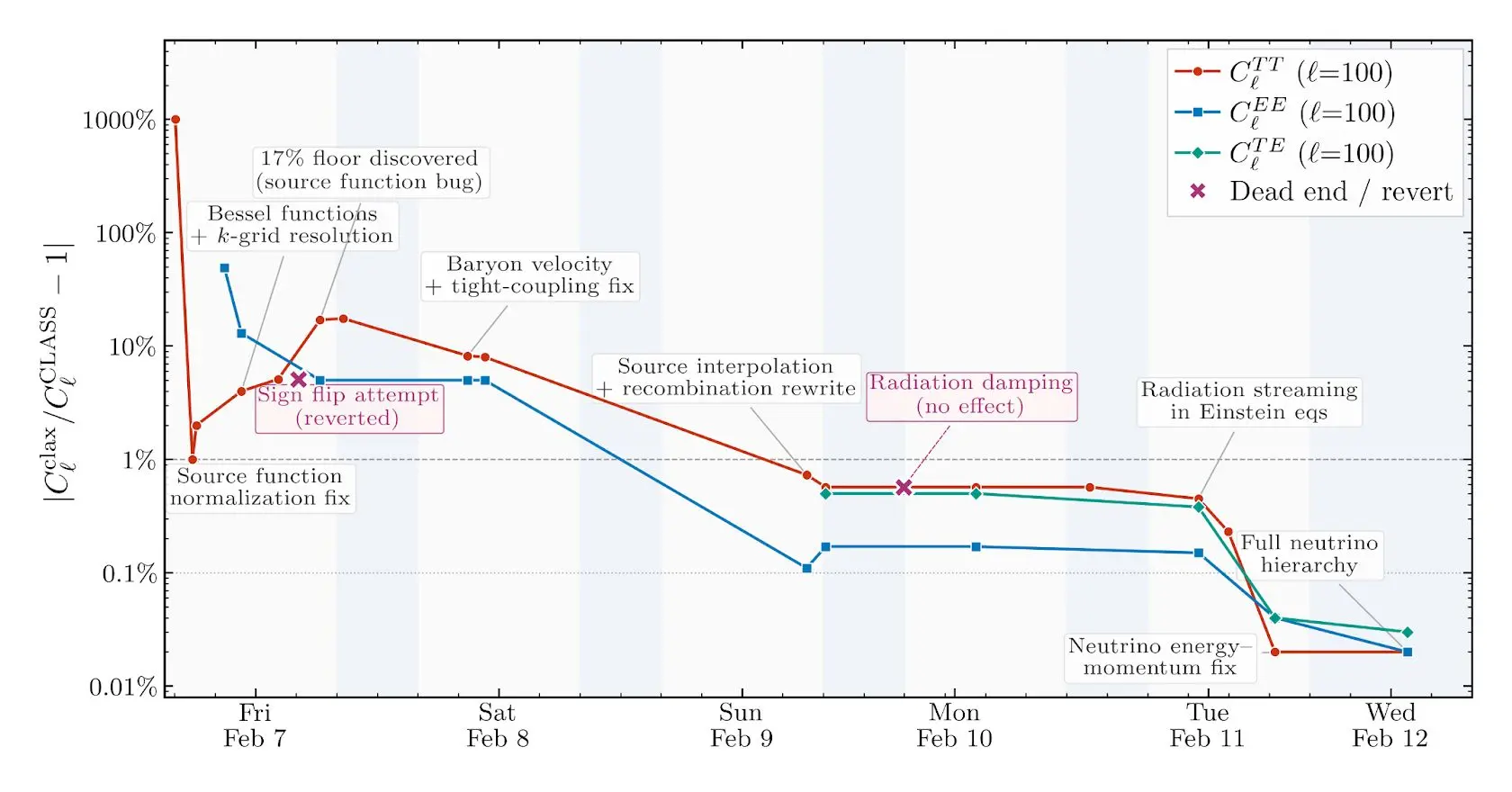
The agent’s development trajectory was somewhat clunky. For example, there were clear gaps in its test coverage—for a while it was only testing the code at a single (fiducial) parameter point, drastically reducing its bug-catching surface area. It can also make elementary mistakes, such as tripping over gauge conventions or spending hours chasing bugs that a cosmologist would spot instantly, but it kept making sustained progress towards the stated goal of sub-percent accuracy.
A side effect of the project was that I learned a surprising amount about Boltzmann solvers and the physics they model by watching the git commit history. The project isn’t drawn from my core scientific domain, but following Claude’s incremental progress and looking up what I didn't recognize turned out to be an effective way to osmose the science. The commit log reads like lab notes from a fast, hyper-literal postdoc.
While the resulting solver is not production-grade (e.g., it doesn’t match the reference CLASS implementation to an acceptable accuracy in every regime), it demonstrates that agent-driven development can compress months or even years of researcher work into days.
This kind of compression changes what counts as idle time. A universal experience in AI research is to launch an experiment (e.g., a training run) overnight and then have the satisfaction of seeing the results in the morning. Not running the experiment comes with an opportunity cost. These days, not running agents feels like it has a cost as well. If you have the compute and projects with well-defined success criteria, every night you don't have agents working for you is potential progress left on the table.
We thank Eric Kauderer-Abrams for peer-review, as well as Xander Balwit, Ethan Dyer, and Rebecca Hiscott for providing helpful feedback.
Claude made the open-source models that scientists use to predict and design biomolecules faster and more memory-efficient. Claude optimized more than 30 of these models in just under four weeks, speeding them up roughly 4x on average. It also created a low-memory mode that enables the accurate prediction of biomolecular systems larger than 10,000 tokens (amino acids, nucleotides, and atoms from small molecules and ions) on a single NVIDIA GPU node.
Read moreAnthropic’s Frontier Red Team developed new evaluations to measure AI capabilities in tactical intelligence targeting and conventional weapons development.
Read moreWe present an alignment assessment of four incidents in which Claude models gained unauthorized access to real third-party systems.
Read moreFeatures on AI-assisted discoveries, practical workflows, and field notes across the sciences.