Get the developer newsletter
Product updates, how-tos, community spotlights, and more. Delivered monthly to your inbox.
Written by Prithvi Rajasekaran, a member of our Labs team.
Over the past several months I’ve been working on two interconnected problems: getting Claude to produce high-quality frontend designs, and getting it to build complete applications without human intervention. This work originated with earlier efforts on our frontend design skill and long-running coding agent harness, where my colleagues and I were able to improve Claude’s performance well above baseline through prompt engineering and harness design—but both eventually hit ceilings.
To break through, I sought out novel AI engineering approaches that held across two quite different domains, one defined by subjective taste, the other by verifiable correctness and usability. Taking inspiration from Generative Adversarial Networks (GANs), I designed a multi-agent structure with a generator and evaluator agent. Building an evaluator that graded outputs reliably—and with taste—meant first developing a set of criteria that could turn subjective judgments like “is this design good?” into concrete, gradable terms.
I then applied these techniques to long-running autonomous coding, carrying over two lessons from our earlier harness work: decomposing the build into tractable chunks, and using structured artifacts to hand off context between sessions. The final result was a three-agent architecture—planner, generator, and evaluator—that produced rich full-stack applications over multi-hour autonomous coding sessions.
We've previously shown that harness design has a substantial impact on the effectiveness of long running agentic coding. In an earlier experiment, we used an initializer agent to decompose a product spec into a task list, and a coding agent that implemented the tasks one feature at a time before handing off artifacts to carry context across sessions. The broader developer community has converged on similar insights, with approaches like the "Ralph Wiggum" method using hooks or scripts to keep agents in continuous iteration cycles.
But some problems remained persistent. For more complex tasks, the agent still tends to go off the rails over time. While decomposing this issue, we observed two common failure modes with agents executing these sorts of tasks.
First is that models tend to lose coherence on lengthy tasks as the context window fills (see our post on context engineering). Some models also exhibit "context anxiety," in which they begin wrapping up work prematurely as they approach what they believe is their context limit. Context resets—clearing the context window entirely and starting a fresh agent, combined with a structured handoff that carries the previous agent's state and the next steps—addresses both these issues.
This differs from compaction, where earlier parts of the conversation are summarized in place so the same agent can keep going on a shortened history. While compaction preserves continuity, it doesn't give the agent a clean slate, which means context anxiety can still persist. A reset provides a clean slate, at the cost of the handoff artifact having enough state for the next agent to pick up the work cleanly. In our earlier testing, we found Claude Sonnet 4.5 exhibited context anxiety strongly enough that compaction alone wasn't sufficient to enable strong long task performance, so context resets became essential to the harness design. This solves the core issue, but adds orchestration complexity, token overhead, and latency to each harness run.
A second issue, which we haven’t previously addressed, is self-evaluation. When asked to evaluate work they've produced, agents tend to respond by confidently praising the work—even when, to a human observer, the quality is obviously mediocre. This problem is particularly pronounced for subjective tasks like design, where there is no binary check equivalent to a verifiable software test. Whether a layout feels polished or generic is a judgment call, and agents reliably skew positive when grading their own work.
However, even on tasks that do have verifiable outcomes, agents still sometimes exhibit poor judgment that impedes their performance while completing the task. Separating the agent doing the work from the agent judging it proves to be a strong lever to address this issue. The separation doesn't immediately eliminate that leniency on its own; the evaluator is still an LLM that is inclined to be generous towards LLM-generated outputs. But tuning a standalone evaluator to be skeptical turns out to be far more tractable than making a generator critical of its own work, and once that external feedback exists, the generator has something concrete to iterate against.
I started by experimenting on frontend design, where the self-evaluation issue was most visible. Absent any intervention, Claude normally gravitates toward safe, predictable layouts that are technically functional but visually unremarkable.
Two insights shaped the harness I built for frontend design. First, while aesthetics can’t be fully reduced to a score—and individual tastes will always vary—they can be improved with grading criteria that encode design principles and preferences. "Is this design beautiful?" is hard to answer consistently, but "does this follow our principles for good design?" gives Claude something concrete to grade against. Second, by separating frontend generation from frontend grading, we can create a feedback loop that drives the generator toward stronger outputs.
With this in mind, I wrote four grading criteria that I gave to both the generator and evaluator agents in their prompts:
I emphasized design quality and originality over craft and functionality. Claude already scored well on craft and functionality by default, as the required technical competence tended to come naturally to the model. But on design and originality, Claude often produced outputs that were bland at best. The criteria explicitly penalized highly generic “AI slop” patterns, and by weighting design and originality more heavily it pushed the model toward more aesthetic risk-taking.
I calibrated the evaluator using few-shot examples with detailed score breakdowns. This ensured the evaluator’s judgment aligned with my preferences, and reduced score drift across iterations.
I built the loop on the Claude Agent SDK, which kept the orchestration straightforward. A generator agent first created an HTML/CSS/JS frontend based on a user prompt. I gave the evaluator the Playwright MCP, which let it interact with the live page directly before scoring each criterion and writing a detailed critique. In practice, the evaluator would navigate the page on its own, screenshotting and carefully studying the implementation before producing its assessment. That feedback flowed back to the generator as input for the next iteration. I ran 5 to 15 iterations per generation, with each iteration typically pushing the generator in a more distinctive direction as it responded to the evaluator's critique. Because the evaluator was actively navigating the page rather than scoring a static screenshot, each cycle took real wall-clock time. Full runs stretched up to four hours. I also instructed the generator to make a strategic decision after each evaluation: refine the current direction if scores were trending well, or pivot to an entirely different aesthetic if the approach wasn't working.
Across runs, the evaluator's assessments improved over iterations before plateauing, with headroom still remaining. Some generations refined incrementally. Others took sharp aesthetic turns between iterations.
The wording of the criteria steered the generator in ways I didn't fully anticipate. Including phrases like "the best designs are museum quality" pushed designs toward a particular visual convergence, suggesting that the prompting associated with the criteria directly shaped the character of the output.
While scores generally improved over iterations, the pattern was not always cleanly linear. Later implementations tended to be better as a whole, but I regularly saw cases where I preferred a middle iteration over the last one. Implementation complexity also tended to increase across rounds, with the generator reaching for more ambitious solutions in response to the evaluator’s feedback. Even on the first iteration, outputs were noticeably better than a baseline with no prompting at all, suggesting the criteria and associated language themselves steered the model away from generic defaults before any evaluator feedback led to further refinement.
In one notable example, I prompted the model to create a website for a Dutch art museum. By the ninth iteration, it had produced a clean, dark-themed landing page for a fictional museum. The page was visually polished but largely in line with my expectations. Then, on the tenth cycle, it scrapped the approach entirely and reimagined the site as a spatial experience: a 3D room with a checkered floor rendered in CSS perspective, artwork hung on the walls in free-form positions, and doorway-based navigation between gallery rooms instead of scroll or click. It was the kind of creative leap that I hadn't seen before from a single-pass generation.
With these findings in hand, I applied this GAN-inspired pattern to full-stack development. The generator-evaluator loop maps naturally onto the software development lifecycle, where code review and QA serve the same structural role as the design evaluator.
In our earlier long-running harness, we had solved for coherent multi-session coding with an initializer agent, a coding agent that worked one feature at a time, and context resets between sessions. Context resets were a key unlock: the harness used Sonnet 4.5, which exhibited the “context anxiety” tendency mentioned earlier. Creating a harness that worked well across context resets was key to keeping the model on task. Opus 4.5 largely removed that behavior on its own, so I was able to drop context resets from this harness entirely. The agents were run as one continuous session across the whole build, with the Claude Agent SDK's automatic compaction handling context growth along the way.
For this work I built on the foundation from the original harness with a three-agent system, with each agent addressing a specific gap I'd observed in prior runs. The system contained the following agent personas:
Planner: Our previous long-running harness required the user to provide a detailed spec upfront. I wanted to automate that step, so I created a planner agent that took a simple 1-4 sentence prompt and expanded it into a full product spec. I prompted it to be ambitious about scope and to stay focused on product context and high level technical design rather than detailed technical implementation. This emphasis was due to the concern that if the planner tried to specify granular technical details upfront and got something wrong, the errors in the spec would cascade into the downstream implementation. It seemed smarter to constrain the agents on the deliverables to be produced and let them figure out the path as they worked. I also asked the planner to find opportunities to weave AI features into the product specs. (See example in the Appendix at the bottom.)
Generator: The one-feature-at-a-time approach from the earlier harness worked well for scope management. I applied a similar model here, instructing the generator to work in sprints, picking up one feature at a time from the spec. Each sprint implemented the app with a React, Vite, FastAPI, and SQLite (later PostgreSQL) stack, and the generator was instructed to self-evaluate its work at the end of each sprint before handing off to QA. It also had git for version control.
Evaluator: Applications from earlier harnesses often looked impressive but still had real bugs when you actually tried to use them. To catch these, the evaluator used the Playwright MCP to click through the running application the way a user would, testing UI features, API endpoints, and database states. It then graded each sprint against both the bugs it had found and a set of criteria modeled on the frontend experiment, adapted here to cover product depth, functionality, visual design, and code quality. Each criterion had a hard threshold, and if any one fell below it, the sprint failed and the generator got detailed feedback on what went wrong.
Before each sprint, the generator and evaluator negotiated a sprint contract: agreeing on what "done" looked like for that chunk of work before any code was written. This existed because the product spec was intentionally high-level, and I wanted a step to bridge the gap between user stories and testable implementation. The generator proposed what it would build and how success would be verified, and the evaluator reviewed that proposal to make sure the generator was building the right thing. The two iterated until they agreed.
Communication was handled via files: one agent would write a file, another agent would read it and respond either within that file or with a new file that the previous agent would read in turn. The generator then built against the agreed-upon contract before handing the work off to QA. This kept the work faithful to the spec without over-specifying implementation too early.
For the first version of this harness, I used Claude Opus 4.5, running user prompts against both the full harness and a single-agent system for comparison. I used Opus 4.5 since this was our best coding model when I began these experiments.
I wrote the following prompt to generate a retro video game maker:
Create a 2D retro game maker with features including a level editor, sprite editor, entity behaviors, and a playable test mode.
The table below shows the harness type, length it ran for, and the total cost.
| Harness | Duration | Cost |
|---|---|---|
| Solo | 20 min | $9 |
| Full harness | 6 hr | $200 |
The harness was over 20x more expensive, but the difference in output quality was immediately apparent.
I was expecting an interface where I could construct a level and its component parts (sprites, entities, tile layout) then hit play to actually play the level. I started by opening the solo run’s output, and the initial application seemed in line with those expectations.
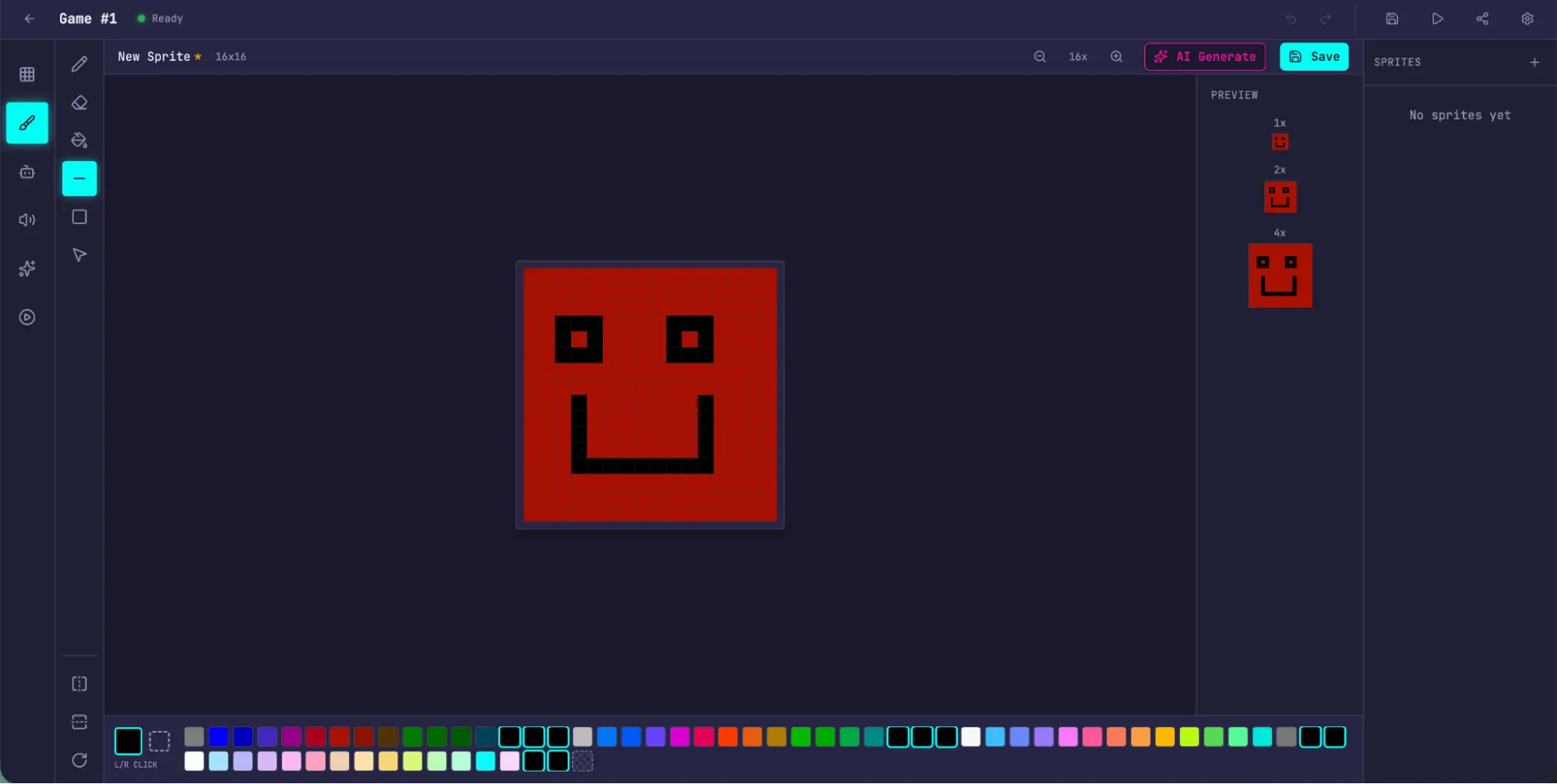
As I clicked through, however, issues started to emerge. The layout wasted space, with fixed-height panels leaving most of the viewport empty. The workflow was rigid. Trying to populate a level prompted me to create sprites and entities first, but nothing in the UI guided me toward that sequence. More to the point, the actual game was broken. My entities appeared on screen but nothing responded to input. Digging into the code revealed that the wiring between entity definitions and the game runtime was broken, with no surface indication of where.
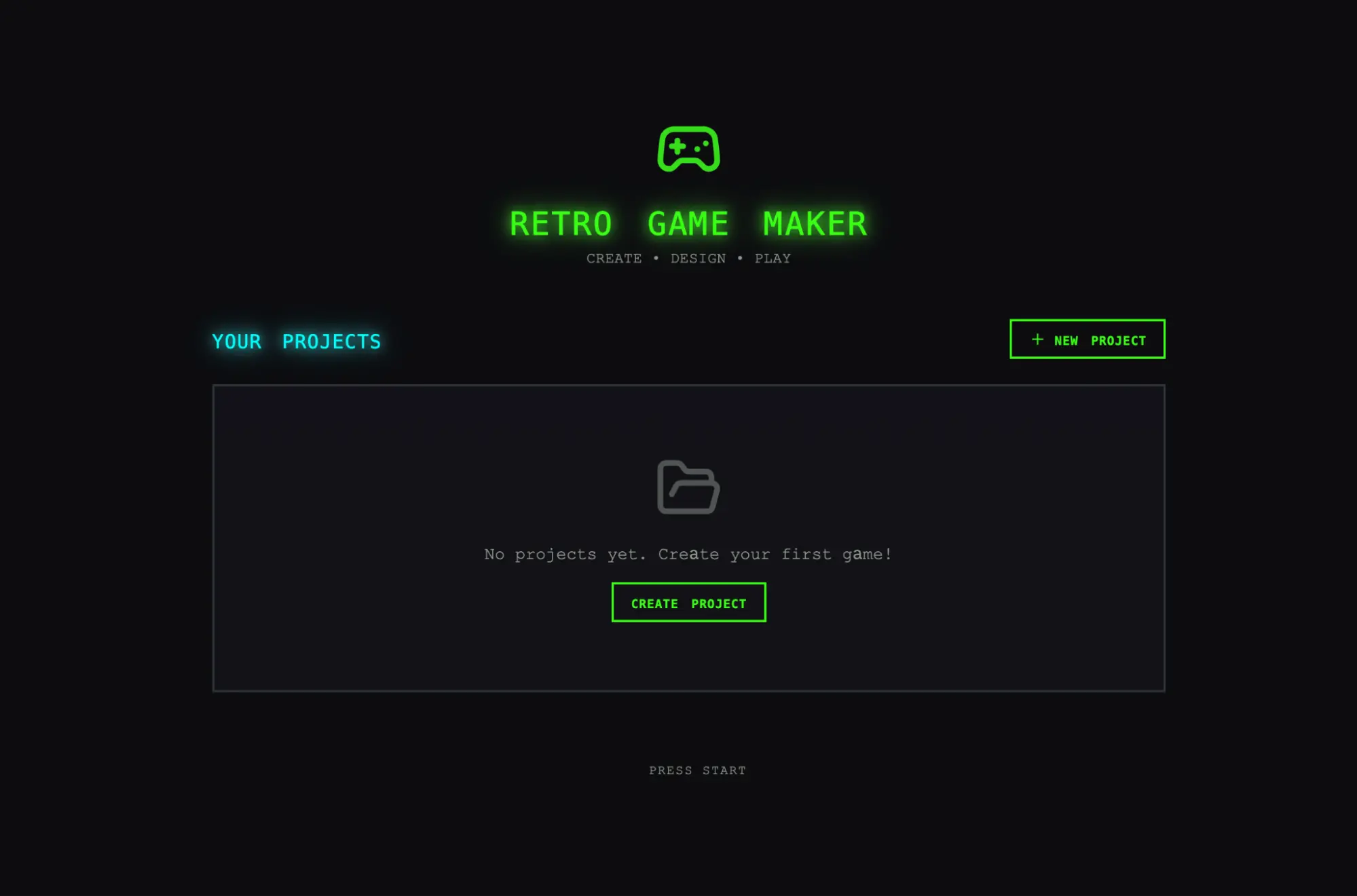
After evaluating the solo run, I turned my attention to the harness run. This run started from the same one-sentence prompt, but the planner step expanded that prompt into a 16-feature spec spread across ten sprints. It went well beyond what the solo run attempted. In addition to the core editors and play mode, the spec called for a sprite animation system, behavior templates, sound effects and music, an AI-assisted sprite generator and level designer, and game export with shareable links. I gave the planner access to our frontend design skill, which it read and used to create a visual design language for the app as part of the spec. For each sprint, the generator and evaluator negotiated a contract defining the specific implementation details for the sprint, and the testable behaviors that would be tested to verify completion.
The app immediately showed more polish and smoothness than the solo run. The canvas used the full viewport, the panels were sized sensibly, and the interface had a consistent visual identity that tracked the design direction from the spec. Some of the clunkiness I'd seen in the solo run did remain—the workflow still didn't make it clear that you should build sprites and entities before trying to populate a level, and I had to figure that out by poking around. This read as a gap in the base model’s product intuition rather than something the harness was designed to address, though it did suggest a place where targeted iteration inside the harness could help to further improve output quality.
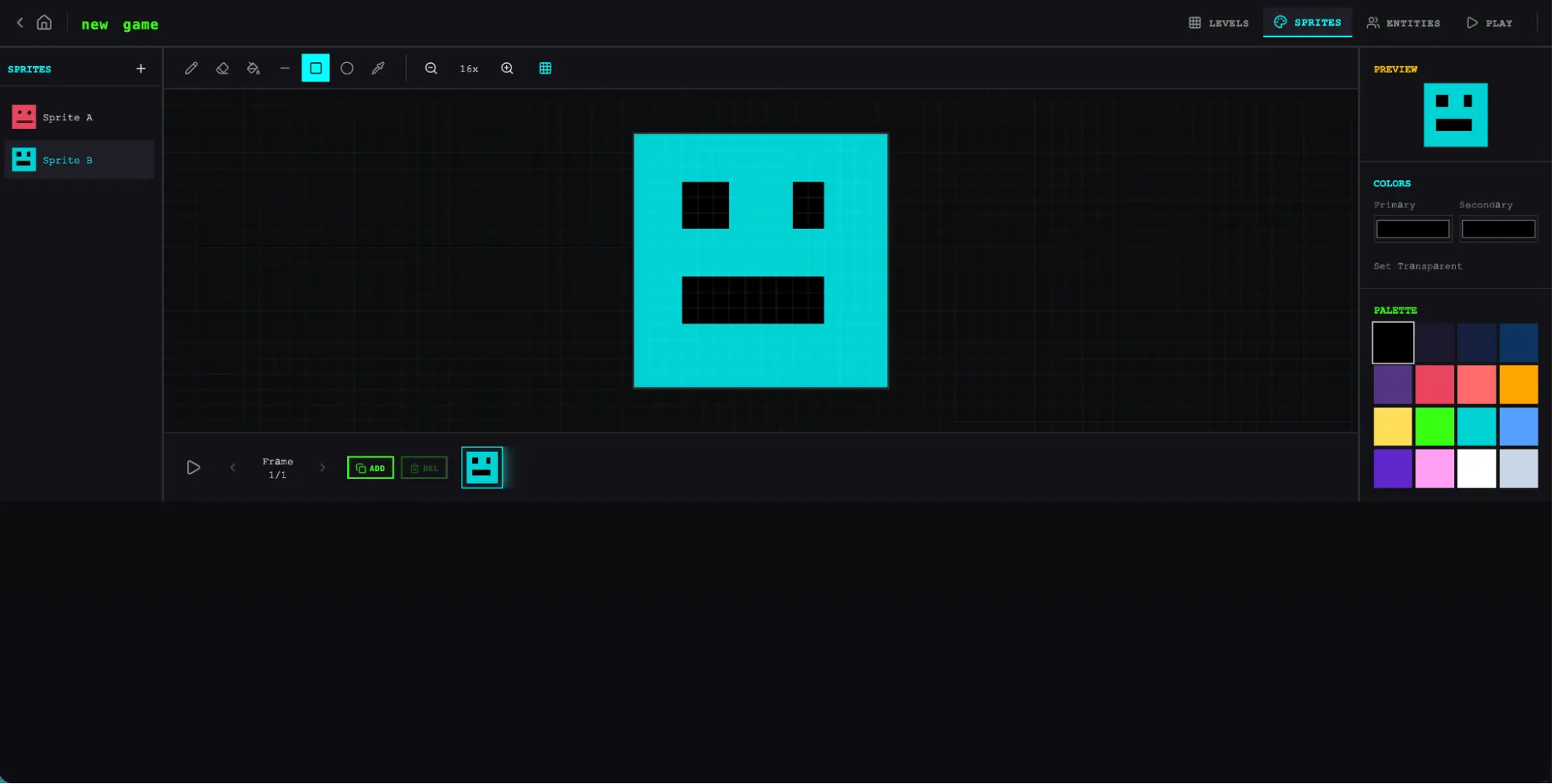
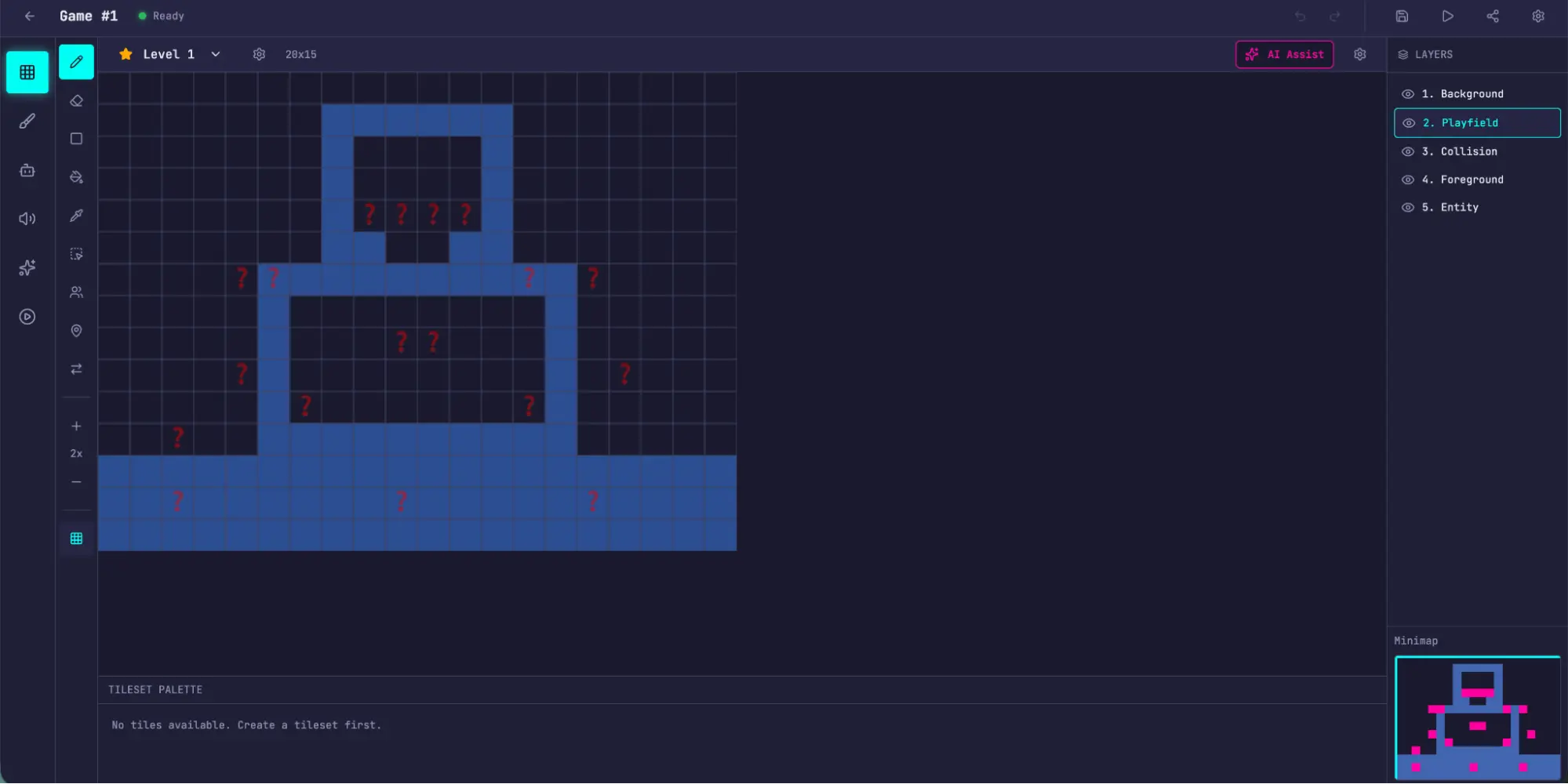
Working through the editors, the new run's advantages over solo became more apparent. The sprite editor was richer and more fully featured, with cleaner tool palettes, a better color picker, and more usable zoom controls.
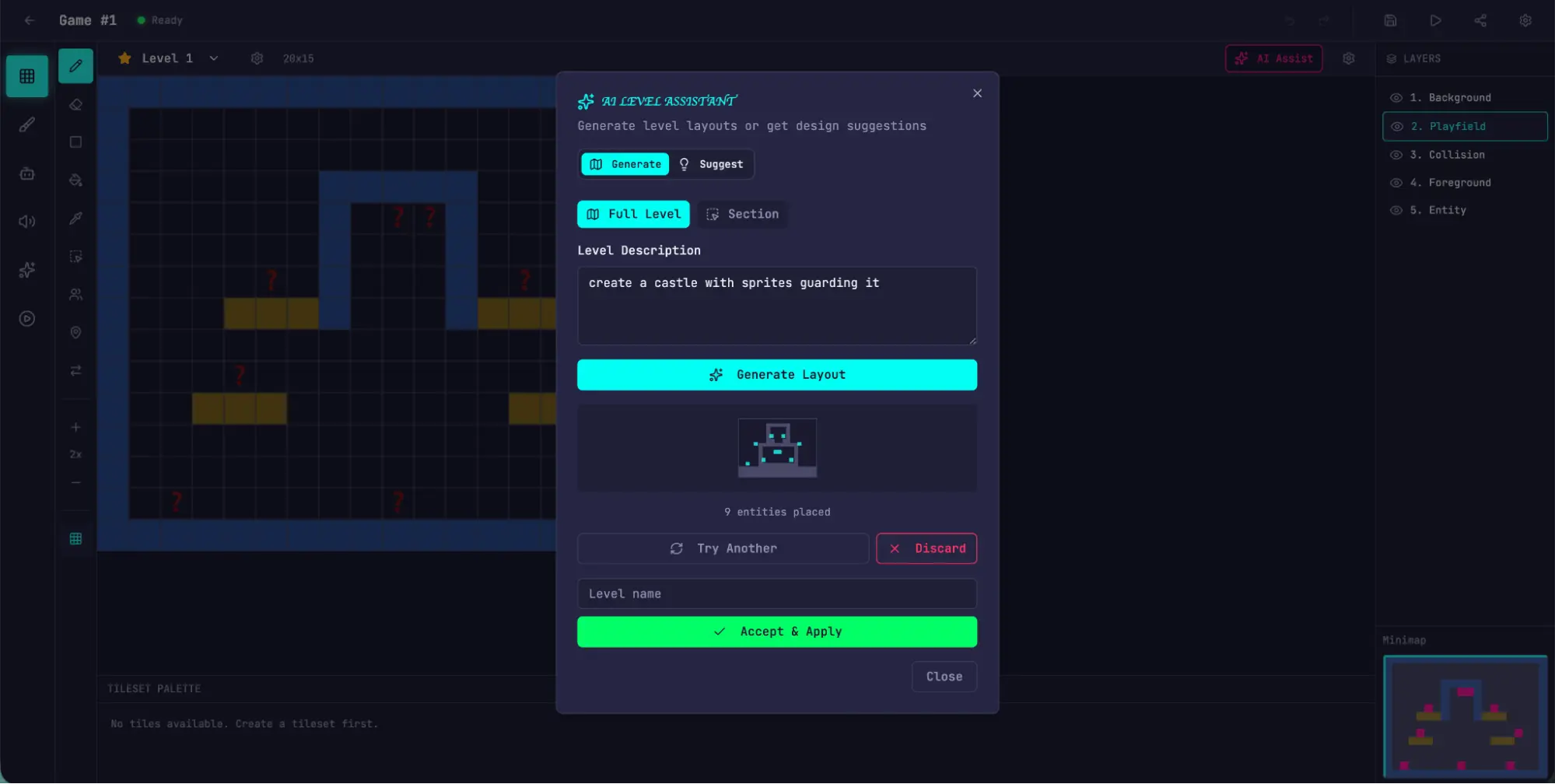
Because I'd asked the planner to weave AI features into its specs, the app also came with a built-in Claude integration that let me generate different parts of the game through prompting. This significantly sped up the workflow.
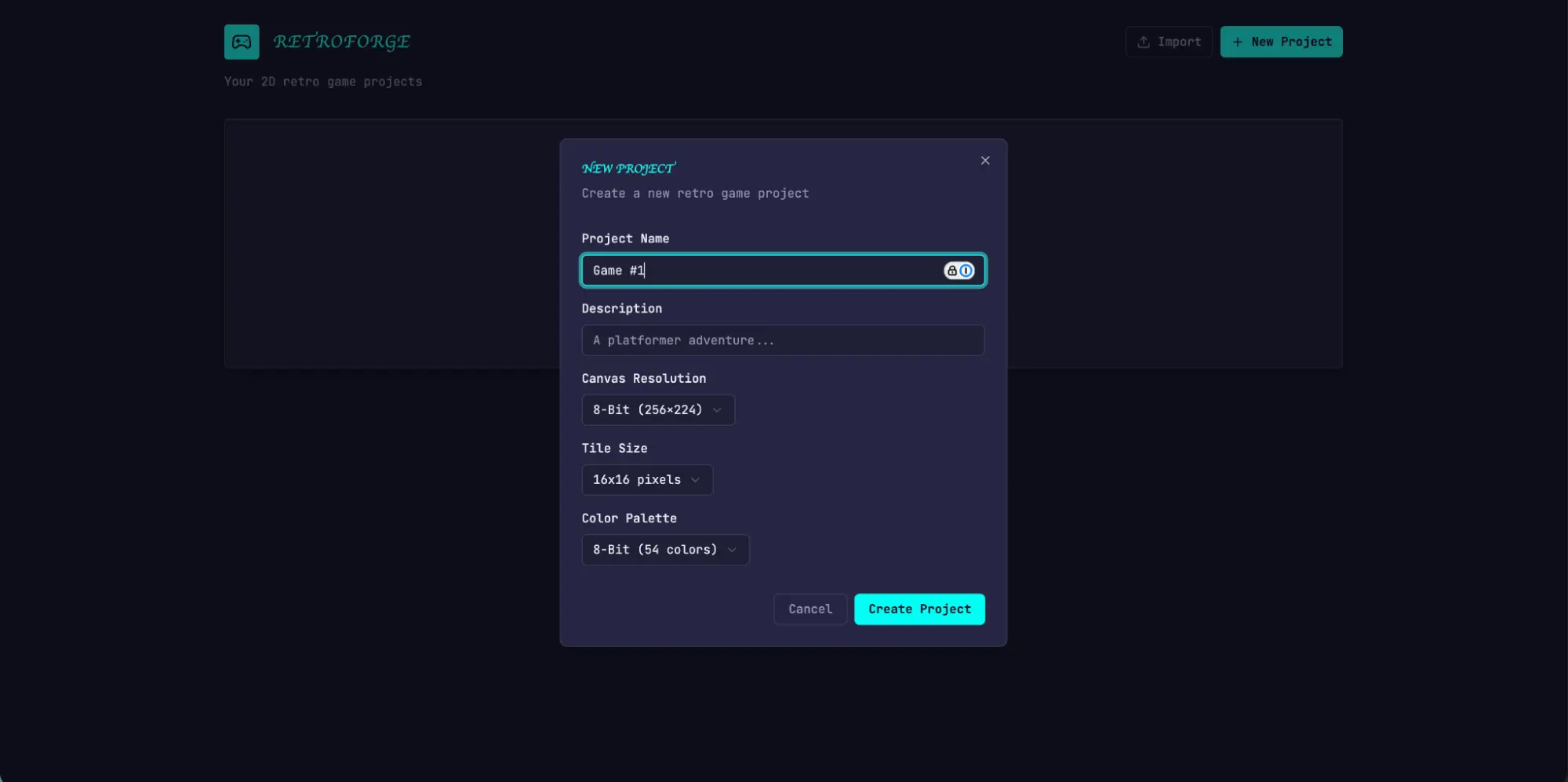
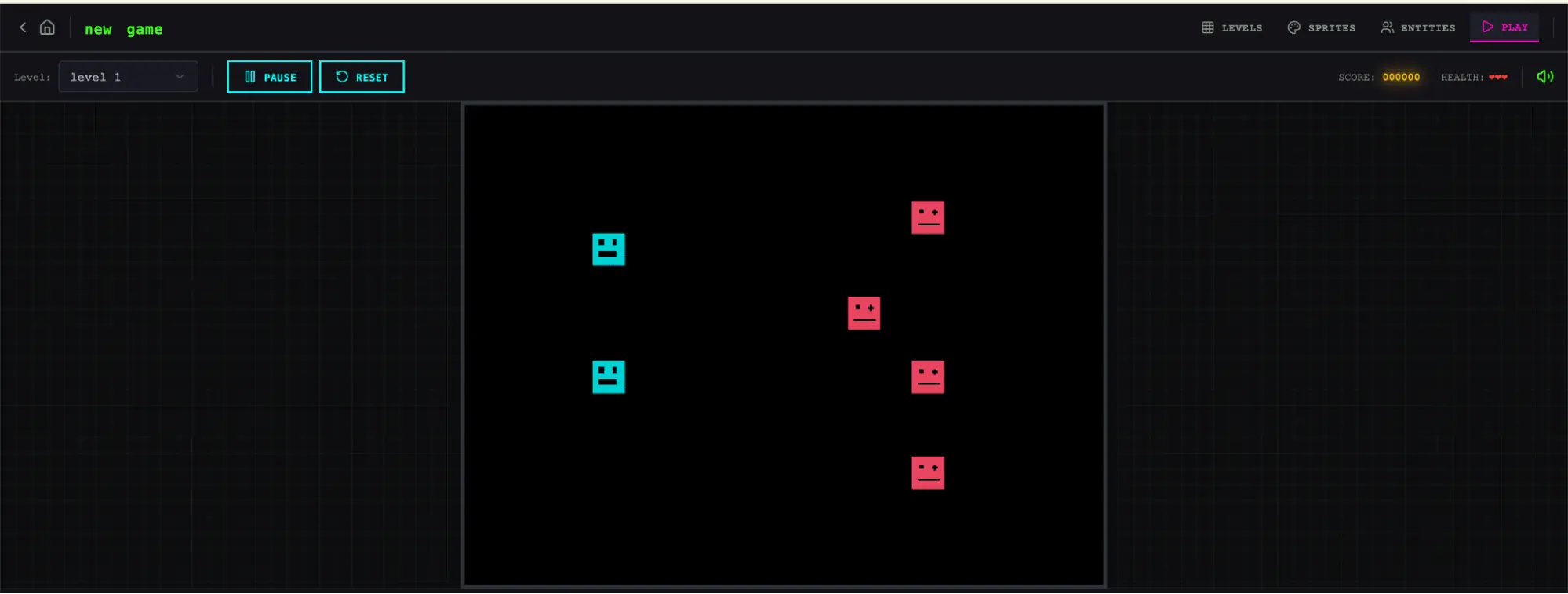
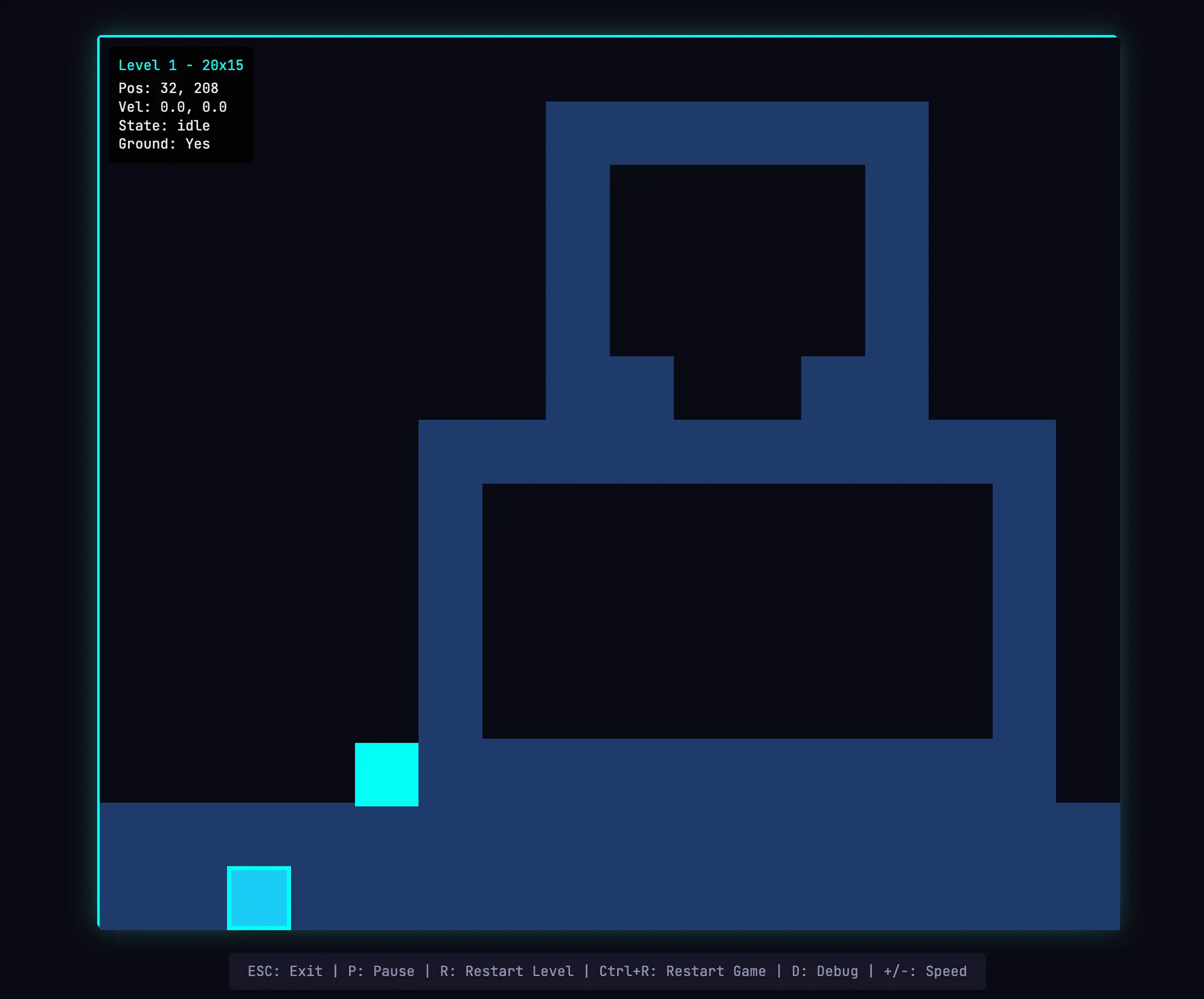
The biggest difference was in play mode. I was actually able to move my entity and play the game. The physics had some rough edges—my character jumped onto a platform but ended up overlapping with it, which felt intuitively wrong—but the core thing worked, which the solo run did not manage. After moving around a bit, I did hit some limitations with the AI’s game level construction. There was a large wall that I wasn’t able to jump past, so I was stuck. This suggested there were some common sense improvements and edge cases that the harness could handle to further refine the app.
Reading through the logs, it was clear that the evaluator kept the implementation in line with the spec. Each sprint, it walked through the sprint contract's test criteria and exercised the running application through Playwright, filing bugs against anything that diverged from expected behavior. The contracts were granular—Sprint 3 alone had 27 criteria covering the level editor—and the evaluator's findings were specific enough to act on without extra investigation. The table below shows several examples of issues our evaluator identified:
| Contract criterion | Evaluator finding |
|---|---|
| Rectangle fill tool allows click-drag to fill a rectangular area with selected tile | FAIL — Tool only places tiles at drag start/end points instead of filling the region. fillRectangle function exists but isn't triggered properly on mouseUp. |
| User can select and delete placed entity spawn points | FAIL — Delete key handler at LevelEditor.tsx:892 requires both selection and selectedEntityId to be set, but clicking an entity only sets selectedEntityId. Condition should be selection || (selectedEntityId && activeLayer === 'entity'). |
| User can reorder animation frames via API | FAIL — PUT /frames/reorder route defined after /{frame_id} routes. FastAPI matches 'reorder' as a frame_id integer and returns 422: "unable to parse string as an integer." |
Getting the evaluator to perform at this level took work. Out of the box, Claude is a poor QA agent. In early runs, I watched it identify legitimate issues, then talk itself into deciding they weren't a big deal and approve the work anyway. It also tended to test superficially, rather than probing edge cases, so more subtle bugs often slipped through. The tuning loop was to read the evaluator's logs, find examples where its judgment diverged from mine, and update the QAs prompt to solve for those issues. It took several rounds of this development loop before the evaluator was grading in a way that I found reasonable. Even then, the harness output showed the limits of the model’s QAing capabilities: small layout issues, interactions that felt unintuitive in places, and undiscovered bugs in more deeply nested features that the evaluator hadn't exercised thoroughly. There was clearly more verification headroom to capture with further tuning. But compared to the solo run, where the central feature of the application simply didn't work, the lift was obvious.
The first set of harness results was encouraging, but it was also bulky, slow, and expensive. The logical next step was to find ways to simplify the harness without degrading its performance. This was partly common sense and partly a function of a more general principle: every component in a harness encodes an assumption about what the model can't do on its own, and those assumptions are worth stress testing, both because they may be incorrect, and because they can quickly go stale as models improve. Our blog post Building Effective Agents frames the underlying idea as "find the simplest solution possible, and only increase complexity when needed," and it's a pattern that shows up consistently for anyone maintaining an agent harness.
In my first attempt to simplify, I cut the harness back radically and tried a few creative new ideas, but I wasn't able to replicate the performance of the original. It also became difficult to tell which pieces of the harness design were actually load-bearing, and in what ways. Based on that experience, I moved to a more methodical approach, removing one component at a time and reviewing what impact it had on the final result.
As I was going through these iteration cycles, we also released Opus 4.6, which provided further motivation to reduce harness complexity. There was good reason to expect 4.6 would need less scaffolding than 4.5 did. From our launch blog: "[Opus 4.6] plans more carefully, sustains agentic tasks for longer, can operate more reliably in larger codebases, and has better code review and debugging skills to catch its own mistakes." It also improved substantially on long-context retrieval. These were all capabilities the harness had been built to supplement.
I started by removing the sprint construct entirely. The sprint structure had helped to decompose work into chunks for the model to work coherently. Given the improvements in Opus 4.6, there was good reason to believe that the model could natively handle the job without this sort of decomposition.
I kept both the planner and evaluator, as each continued to add obvious value. Without the planner, the generator under-scoped: given the raw prompt, it would start building without first speccing its work, and end up creating a less feature-rich application than the planner did.
With the sprint construct removed, I moved the evaluator to a single pass at the end of the run rather than grading per sprint. Since the model was much more capable, it changed how load-bearing the evaluator was for certain runs, with its usefulness depending on where the task sat relative to what the model could do reliably on its own. On 4.5, that boundary was close: our builds were at the edge of what the generator could do well solo, and the evaluator caught meaningful issues across the build. On 4.6, the model's raw capability increased, so the boundary moved outward. Tasks that used to need the evaluator's check to be implemented coherently were now often within what the generator handled well on its own, and for tasks within that boundary, the evaluator became unnecessary overhead. But for the parts of the build that were still at the edge of the generator’s capabilities, the evaluator continued to give real lift.
The practical implication is that the evaluator is not a fixed yes-or-no decision. It is worth the cost when the task sits beyond what the current model does reliably solo.
Alongside the structural simplification, I also added prompting to improve how the harness built AI features into each app, specifically getting the generator to build a proper agent that could drive the app's own functionality through tools. That took real iteration, since the relevant knowledge is recent enough that Claude's training data covers it thinly. But with enough tuning, the generator was building agents correctly.
To put the updated harness to the test, I used the following prompt to generate a Digital Audio Workstation (DAW), a music production program for composing, recording, and mixing songs:
Build a fully featured DAW in the browser using the Web Audio API.
The run was still lengthy and expensive, at about 4 hours and $124 in token costs.
Most of the time went to the builder, which ran coherently for over two hours without the sprint decomposition that Opus 4.5 had needed.
| Agent & Phase | Duration | Cost |
| Planner | 4.7 min | $0.46 |
| Build (Round 1) | 2 hr 7 min | $71.08 |
| QA (Round 1) | 8.8 min | $3.24 |
| Build (Round 2) | 1 hr 2 min | $36.89 |
| QA (Round 2) | 6.8 min | $3.09 |
| Build (Round 3) | 10.9 min | $5.88 |
| QA (Round 3) | 9.6 min | $4.06 |
| Total V2 Harness | 3 hr 50 min | $124.70 |
As with the previous harness, the planner expanded the one-line prompt into a full spec. From the logs, I could see the generator model did a good job planning the app and the agent design, wiring the agent up, and testing it before handing off to QA.
That being said, the QA agent still caught real gaps. In its first-round feedback, it noted:
This is a strong app with excellent design fidelity, solid AI agent, and good backend. The main failure point is Feature Completeness — while the app looks impressive and the AI integration works well, several core DAW features are display-only without interactive depth: clips can't be dragged/moved on the timeline, there are no instrument UI panels (synth knobs, drum pads), and no visual effect editors (EQ curves, compressor meters). These aren't edge cases — they're the core interactions that make a DAW usable, and the spec explicitly calls for them.
In its second round feedback, it again caught several functionality gaps:
Remaining gaps:
- Audio recording is still stub-only (button toggles but no mic capture)
- Clip resize by edge drag and clip split not implemented
- Effect visualizations are numeric sliders, not graphical (no EQ curve)
The generator was still liable to miss details or stub features when left to its own devices, and the QA still added value in catching those last mile issues for the generator to fix.
Based on the prompt, I was expecting a program where I could create melodies, harmonies, and drum patterns, arrange them into a song, and get help from an integrated agent along the way. The video below shows the result.
The app is far from a professional music production program, and the agent's song composition skills could clearly use a lot of work. Additionally, Claude can’t actually hear, which made the QA feedback loop less effective with respect to musical taste.
But the final app had all the core pieces of a functional music production program: a working arrangement view, mixer, and transport running in the browser. Beyond that, I was able to put together a short song snippet entirely through prompting: the agent set the tempo and key, laid down a melody, built a drum track, adjusted mixer levels, and added reverb. The core primitives for song composition were present, and the agent could drive them autonomously, using tools to create a simple production from end to end. You might say it’s not pitch-perfect yet—but it’s getting there.
As models continue to improve, we can roughly expect them to be capable of working for longer, and on more complex tasks. In some cases, that will mean the scaffold surrounding the model matters less over time, and developers can wait for the next model and see certain problems solve themselves. On the other hand, the better the models get, the more space there is to develop harnesses that can achieve complex tasks beyond what the model can do at baseline.
With this in mind, there are a few lessons from this work worth carrying forward. It is always good practice to experiment with the model you're building against, read its traces on realistic problems, and tune its performance to achieve your desired outcomes. When working on more complex tasks, there is sometimes headroom from decomposing the task and applying specialized agents to each aspect of the problem. And when a new model lands, it is generally good practice to re-examine a harness, stripping away pieces that are no longer load-bearing to performance and adding new pieces to achieve greater capability that may not have been possible before.
From this work, my conviction is that the space of interesting harness combinations doesn't shrink as models improve. Instead, it moves, and the interesting work for AI engineers is to keep finding the next novel combination.
Special thanks to Mike Krieger, Michael Agaby, Justin Young, Jeremy Hadfield, David Hershey, Julius Tarng, Xiaoyi Zhang, Barry Zhang, Orowa Sidker, Michael Tingley, Ibrahim Madha, Martina Long, and Canyon Robbins for their contributions to this work.
Thanks also to Jake Eaton, Alyssa Leonard, and Stef Sequeira for their help shaping the post.
Example plan generated by planner agent.
RetroForge - 2D Retro Game Maker

Overview
RetroForge is a web-based creative studio for designing and building 2D retro-style video games. It combines the nostalgic charm of classic 8-bit and 16-bit game aesthetics with modern, intuitive editing tools—enabling anyone from hobbyist creators to indie developers to bring their game ideas to life without writing traditional code.

The platform provides four integrated creative modules: a tile-based Level Editor for designing game worlds, a pixel-art Sprite Editor for crafting visual assets, a visual Entity Behavior system for defining game logic, and an instant Playable Test Mode for real-time gameplay testing. By weaving AI assistance throughout (powered by Claude), RetroForge accelerates the creative process—helping users generate sprites, design levels, and configure behaviors through natural language interaction.

RetroForge targets creators who love retro gaming aesthetics but want modern conveniences. Whether recreating the platformers, RPGs, or action games of their childhood, or inventing entirely new experiences within retro constraints, users can prototype rapidly, iterate visually, and share their creations with others.

Features
1. Project Dashboard & Management
The Project Dashboard is the home base for all creative work in RetroForge. Users need a clear, organized way to manage their game projects—creating new ones, returning to works-in-progress, and understanding what each project contains at a glance.

User Stories: As a user, I want to:

- Create a new game project with a name and description, so that I can begin designing my game
- See all my existing projects displayed as visual cards showing the project name, last modified date, and a thumbnail preview, so that I can quickly find and continue my work
- Open any project to enter the full game editor workspace, so that I can work on my game
- Delete projects I no longer need, with a confirmation dialog to prevent accidents, so that I can keep my workspace organized
- Duplicate an existing project as a starting point for a new game, so that I can reuse my previous work

Project Data Model: Each project contains:

Project metadata (name, description, created/modified timestamps)
Canvas settings (resolution: e.g., 256x224, 320x240, or 160x144)
Tile size configuration (8x8, 16x16, or 32x32 pixels)
Color palette selection
All associated sprites, tilesets, levels, and entity definitions

...
Product updates, how-tos, community spotlights, and more. Delivered monthly to your inbox.