Get the developer newsletter
Product updates, how-tos, community spotlights, and more. Delivered monthly to your inbox.

The future of AI agents is one where models work seamlessly across hundreds or thousands of tools. An IDE assistant that integrates git operations, file manipulation, package managers, testing frameworks, and deployment pipelines. An operations coordinator that connects Slack, GitHub, Google Drive, Jira, company databases, and dozens of MCP servers simultaneously.
To build effective agents, they need to work with unlimited tool libraries without stuffing every definition into context upfront. Our blog article on using code execution with MCP discussed how tool results and definitions can sometimes consume 50,000+ tokens before an agent reads a request. Agents should discover and load tools on-demand, keeping only what's relevant for the current task.
Agents also need the ability to call tools from code. When using natural language tool calling, each invocation requires a full inference pass, and intermediate results pile up in context whether they're useful or not. Code is a natural fit for orchestration logic, such as loops, conditionals, and data transformations. Agents need the flexibility to choose between code execution and inference based on the task at hand.
Agents also need to learn correct tool usage from examples, not just schema definitions. JSON schemas define what's structurally valid, but can't express usage patterns: when to include optional parameters, which combinations make sense, or what conventions your API expects.
Today, we're releasing three features that make this possible:
In internal testing, we’ve found these features have helped us build things that wouldn’t have been possible with conventional tool use patterns. For example, Claude for Excel uses Programmatic Tool Calling to read and modify spreadsheets with thousands of rows without overloading the model’s context window.
Based on our experience, we believe these features open up new possibilities for what you can build with Claude.
MCP tool definitions provide important context, but as more servers connect, those tokens can add up. Consider a five-server setup:
That's 58 tools consuming approximately 55K tokens before the conversation even starts. Add more servers like Jira (which alone uses ~17K tokens) and you're quickly approaching 100K+ token overhead. At Anthropic, we've seen tool definitions consume 134K tokens before optimization.
But token cost isn't the only issue. The most common failures are wrong tool selection and incorrect parameters, especially when tools have similar names like notification-send-user vs. notification-send-channel.
Instead of loading all tool definitions upfront, the Tool Search Tool discovers tools on-demand. Claude only sees the tools it actually needs for the current task.
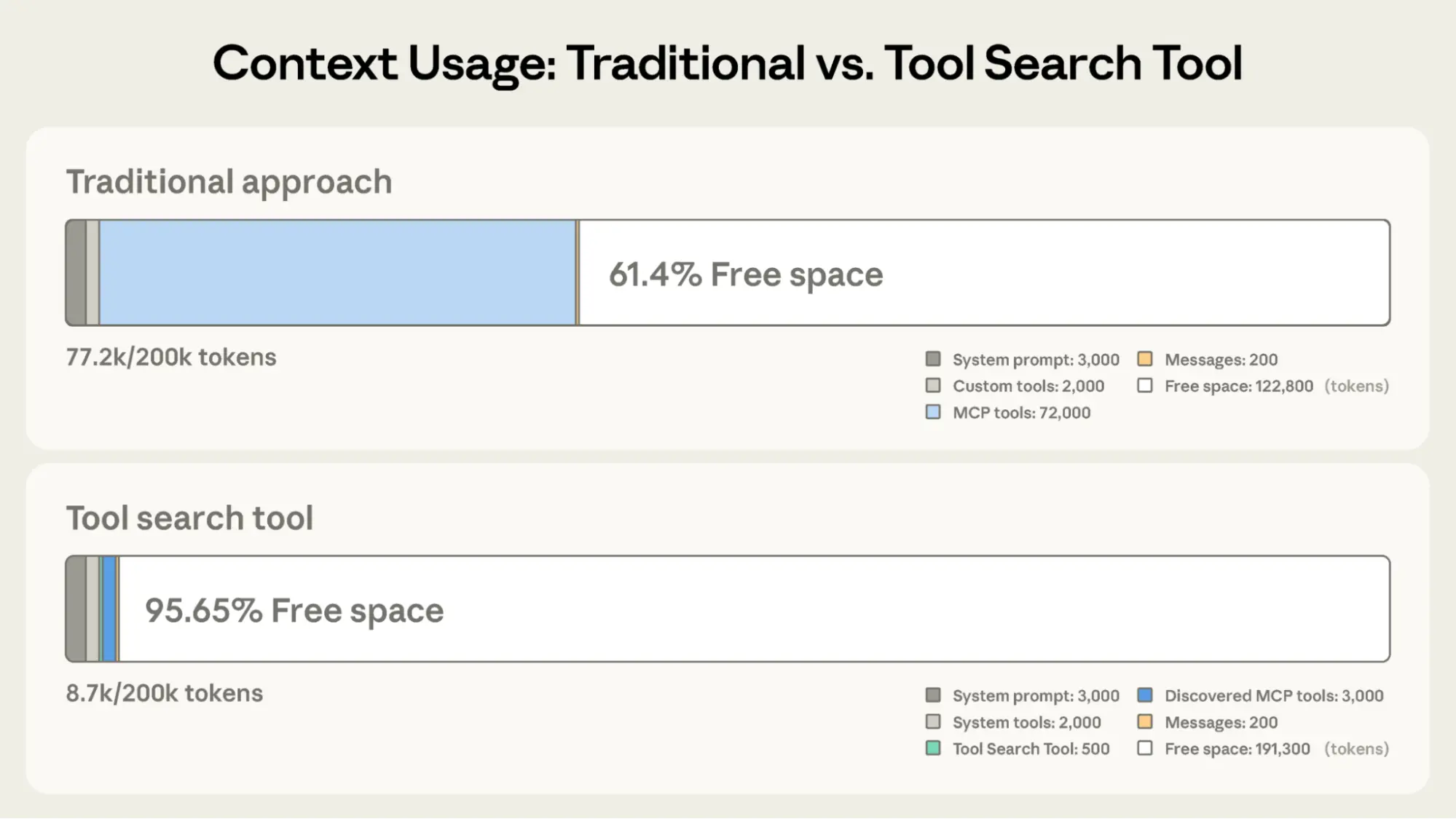
Traditional approach:
With the Tool Search Tool:
This represents an 85% reduction in token usage while maintaining access to your full tool library. Internal testing showed significant accuracy improvements on MCP evaluations when working with large tool libraries. Opus 4 improved from 49% to 74%, and Opus 4.5 improved from 79.5% to 88.1% with Tool Search Tool enabled.
The Tool Search Tool lets Claude dynamically discover tools instead of loading all definitions upfront. You provide all your tool definitions to the API, but mark tools with defer_loading: true to make them discoverable on-demand. Deferred tools aren't loaded into Claude's context initially. Claude only sees the Tool Search Tool itself plus any tools with defer_loading: false (your most critical, frequently-used tools).
When Claude needs specific capabilities, it searches for relevant tools. The Tool Search Tool returns references to matching tools, which get expanded into full definitions in Claude's context.
For example, if Claude needs to interact with GitHub, it searches for "github," and only github.createPullRequest and github.listIssues get loaded—not your other 50+ tools from Slack, Jira, and Google Drive.
This way, Claude has access to your full tool library while only paying the token cost for tools it actually needs.
Prompt caching note: Tool Search Tool doesn't break prompt caching because deferred tools are excluded from the initial prompt entirely. They're only added to context after Claude searches for them, so your system prompt and core tool definitions remain cacheable.
Implementation:
{
  "tools": [
    // Include a tool search tool (regex, BM25, or custom)
    {"type": "tool_search_tool_regex_20251119", "name": "tool_search_tool_regex"},

    // Mark tools for on-demand discovery
    {
      "name": "github.createPullRequest",
      "description": "Create a pull request",
      "input_schema": {...},
      "defer_loading": true
    }
    // ... hundreds more deferred tools with defer_loading: true
  ]
}
For MCP servers, you can defer loading entire servers while keeping specific high-use tools loaded:
{
  "type": "mcp_toolset",
  "mcp_server_name": "google-drive",
  "default_config": {"defer_loading": true}, # defer loading the entire server
  "configs": {
    "search_files": {
"defer_loading": false
    }  // Keep most used tool loaded
  }
}The Claude Developer Platform provides regex-based and BM25-based search tools out of the box, but you can also implement custom search tools using embeddings or other strategies.
Like any architectural decision, enabling the Tool Search Tool involves trade-offs. The feature adds a search step before tool invocation, so it delivers the best ROI when the context savings and accuracy improvements outweigh additional latency.
Use it when:
Less beneficial when:
Traditional tool calling creates two fundamental problems as workflows become more complex:
Programmatic Tool Calling enables Claude to orchestrate tools through code rather than through individual API round-trips. Instead of Claude requesting tools one at a time with each result being returned to its context, Claude writes code that calls multiple tools, processes their outputs, and controls what information actually enters its context window.
Claude excels at writing code and by letting it express orchestration logic in Python rather than through natural language tool invocations, you get more reliable, precise control flow. Loops, conditionals, data transformations, and error handling are all explicit in code rather than implicit in Claude's reasoning.
Consider a common business task: "Which team members exceeded their Q3 travel budget?"
You have three tools available:
get_team_members(department) - Returns team member list with IDs and levelsget_expenses(user_id, quarter) - Returns expense line items for a userget_budget_by_level(level) - Returns budget limits for an employee levelTraditional approach:
With Programmatic Tool Calling:
Instead of each tool result returning to Claude, Claude writes a Python script that orchestrates the entire workflow. The script runs in the Code Execution tool (a sandboxed environment), pausing when it needs results from your tools. When you return tool results via the API, they're processed by the script rather than consumed by the model. The script continues executing, and Claude only sees the final output.
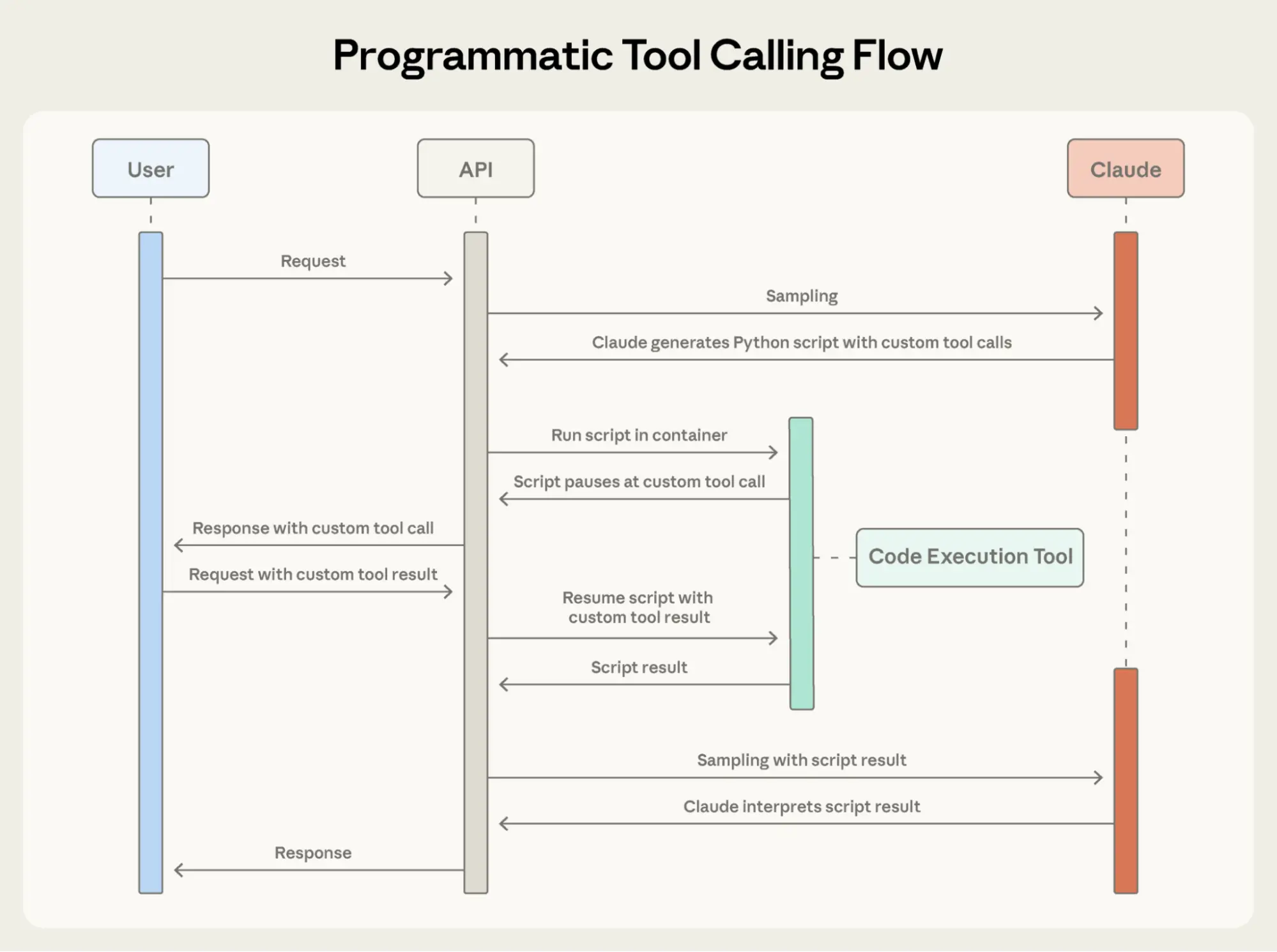
Here's what Claude's orchestration code looks like for the budget compliance task:
team = await get_team_members("engineering")

# Fetch budgets for each unique level
levels = list(set(m["level"] for m in team))
budget_results = await asyncio.gather(*[
    get_budget_by_level(level) for level in levels
])

# Create a lookup dictionary: {"junior": budget1, "senior": budget2, ...}
budgets = {level: budget for level, budget in zip(levels, budget_results)}

# Fetch all expenses in parallel
expenses = await asyncio.gather(*[
    get_expenses(m["id"], "Q3") for m in team
])

# Find employees who exceeded their travel budget
exceeded = []
for member, exp in zip(team, expenses):
    budget = budgets[member["level"]]
    total = sum(e["amount"] for e in exp)
    if total > budget["travel_limit"]:
        exceeded.append({
            "name": member["name"],
            "spent": total,
            "limit": budget["travel_limit"]
        })

print(json.dumps(exceeded))Claude's context receives only the final result: the two to three people who exceeded their budget. The 2,000+ line items, the intermediate sums, and the budget lookups do not affect Claude’s context, reducing consumption from 200KB of raw expense data to just 1KB of results.
The efficiency gains are substantial:
Production workflows involve messy data, conditional logic, and operations that need to scale. Programmatic Tool Calling lets Claude handle that complexity programmatically while keeping its focus on actionable results rather than raw data processing.
Add code_execution to tools, and set allowed_callers to opt-in tools for programmatic execution:
{
  "tools": [
    {
      "type": "code_execution_20250825",
      "name": "code_execution"
    },
    {
      "name": "get_team_members",
      "description": "Get all members of a department...",
      "input_schema": {...},
      "allowed_callers": ["code_execution_20250825"] # opt-in to programmatic tool calling
    },
    {
      "name": "get_expenses",
 	...
    },
    {
      "name": "get_budget_by_level",
	...
    }
  ]
}The API converts these tool definitions into Python functions that Claude can call.
Instead of requesting tools one at a time, Claude generates Python code:
{
  "type": "server_tool_use",
  "id": "srvtoolu_abc",
  "name": "code_execution",
  "input": {
    "code": "team = get_team_members('engineering')\n..." # the code example above
  }
}When the code calls get_expenses(), you receive a tool request with a caller field:
{
  "type": "tool_use",
  "id": "toolu_xyz",
  "name": "get_expenses",
  "input": {"user_id": "emp_123", "quarter": "Q3"},
  "caller": {
    "type": "code_execution_20250825",
    "tool_id": "srvtoolu_abc"
  }
}You provide the result, which is processed in the Code Execution environment rather than Claude's context. This request-response cycle repeats for each tool call in the code.
When the code finishes running, only the results of the code are returned to Claude:
{
  "type": "code_execution_tool_result",
  "tool_use_id": "srvtoolu_abc",
  "content": {
    "stdout": "[{\"name\": \"Alice\", \"spent\": 12500, \"limit\": 10000}...]"
  }
}This is all Claude sees, not the 2000+ expense line items processed along the way.
Programmatic Tool Calling adds a code execution step to your workflow. This extra overhead pays off when the token savings, latency improvements, and accuracy gains are substantial.
Most beneficial when:
Less beneficial when:
JSON Schema excels at defining structure–types, required fields, allowed enums–but it can't express usage patterns: when to include optional parameters, which combinations make sense, or what conventions your API expects.
Consider a support ticket API:
{
  "name": "create_ticket",
  "input_schema": {
    "properties": {
      "title": {"type": "string"},
      "priority": {"enum": ["low", "medium", "high", "critical"]},
      "labels": {"type": "array", "items": {"type": "string"}},
      "reporter": {
        "type": "object",
        "properties": {
          "id": {"type": "string"},
          "name": {"type": "string"},
          "contact": {
            "type": "object",
            "properties": {
              "email": {"type": "string"},
              "phone": {"type": "string"}
            }
          }
        }
      },
      "due_date": {"type": "string"},
      "escalation": {
        "type": "object",
        "properties": {
          "level": {"type": "integer"},
          "notify_manager": {"type": "boolean"},
          "sla_hours": {"type": "integer"}
        }
      }
    },
    "required": ["title"]
  }
}The schema defines what's valid, but leaves critical questions unanswered:
due_date use "2024-11-06", "Nov 6, 2024", or "2024-11-06T00:00:00Z"?reporter.id a UUID, "USR-12345", or just "12345"?reporter.contact?escalation.level and escalation.sla_hours relate to priority?These ambiguities can lead to malformed tool calls and inconsistent parameter usage.
Tool Use Examples let you provide sample tool calls directly in your tool definitions. Instead of relying on schema alone, you show Claude concrete usage patterns:
{
    "name": "create_ticket",
    "input_schema": { /* same schema as above */ },
    "input_examples": [
      {
        "title": "Login page returns 500 error",
        "priority": "critical",
        "labels": ["bug", "authentication", "production"],
        "reporter": {
          "id": "USR-12345",
          "name": "Jane Smith",
          "contact": {
            "email": "jane@acme.com",
            "phone": "+1-555-0123"
          }
        },
        "due_date": "2024-11-06",
        "escalation": {
          "level": 2,
          "notify_manager": true,
          "sla_hours": 4
        }
      },
      {
        "title": "Add dark mode support",
        "labels": ["feature-request", "ui"],
        "reporter": {
          "id": "USR-67890",
          "name": "Alex Chen"
        }
      },
      {
        "title": "Update API documentation"
      }
    ]
}From these three examples, Claude learns:
In our own internal testing, tool use examples improved accuracy from 72% to 90% on complex parameter handling.
Tool Use Examples add tokens to your tool definitions, so they’re most valuable when accuracy improvements outweigh the additional cost.
Most beneficial when:
create_ticket vs create_incident)Less beneficial when:
Building agents that take real-world actions means handling scale, complexity, and precision simultaneously. These three features work together to solve different bottlenecks in tool use workflows. Here's how to combine them effectively.
Not every agent needs to use all three features for a given task. Start with your biggest bottleneck:
This focused approach lets you address the specific constraint limiting your agent's performance, rather than adding complexity upfront.
Then layer additional features as needed. They're complementary: Tool Search Tool ensures the right tools are found, Programmatic Tool Calling ensures efficient execution, and Tool Use Examples ensure correct invocation.
Tool search matches against names and descriptions, so clear, descriptive definitions improve discovery accuracy.
// Good
{
    "name": "search_customer_orders",
    "description": "Search for customer orders by date range, status, or total amount. Returns order details including items, shipping, and payment info."
}

// Bad
{
    "name": "query_db_orders",
    "description": "Execute order query"
}Add system prompt guidance so Claude knows what's available:
You have access to tools for Slack messaging, Google Drive file management,
Jira ticket tracking, and GitHub repository operations. Use the tool search
to find specific capabilities.Keep your three to five most-used tools always loaded, defer the rest. This balances immediate access for common operations with on-demand discovery for everything else.
Since Claude writes code to parse tool outputs, document return formats clearly. This helps Claude write correct parsing logic:
{
    "name": "get_orders",
    "description": "Retrieve orders for a customer.
Returns:
    List of order objects, each containing:
    - id (str): Order identifier
    - total (float): Order total in USD
    - status (str): One of 'pending', 'shipped', 'delivered'
    - items (list): Array of {sku, quantity, price}
    - created_at (str): ISO 8601 timestamp"
}See below for opt-in tools that benefit from programmatic orchestration:
Craft examples for behavioral clarity:
These features are available in beta. To enable them, add the beta header and include the tools you need:
client.beta.messages.create(
    betas=["advanced-tool-use-2025-11-20"],
    model="claude-sonnet-4-5-20250929",
    max_tokens=4096,
    tools=[
        {"type": "tool_search_tool_regex_20251119", "name": "tool_search_tool_regex"},
        {"type": "code_execution_20250825", "name": "code_execution"},
        # Your tools with defer_loading, allowed_callers, and input_examples
    ]
)For detailed API documentation and SDK examples, see our:
These features move tool use from simple function calling toward intelligent orchestration. As agents tackle more complex workflows spanning dozens of tools and large datasets, dynamic discovery, efficient execution, and reliable invocation become foundational.
We're excited to see what you build.
Written by Bin Wu, with contributions from Adam Jones, Artur Renault, Henry Tay, Jake Noble, Noah Picard, Sam Jiang, and the Claude Developer Platform team. This work builds on foundational research by Chris Gorgolewski, Daniel Jiang, Jeremy Fox and Mike Lambert. We also drew inspiration from across the AI ecosystem, including Joel Pobar's LLMVM, Cloudflare's Code Mode and Code Execution as MCP. Special thanks to Andy Schumeister, Hamish Kerr, Keir Bradwell, Matt Bleifer and Molly Vorwerck for their support.
Product updates, how-tos, community spotlights, and more. Delivered monthly to your inbox.